
The default password credentials when connecting are
username:
password:
Supported platforms: CODESYS 3.5
This section describes how to connect to 6505 unit using SSH, SCP or Serial connections.
|
|
The default password credentials when connecting are username: password:
|
|
|
The password can be changed using SSH, see section Configuring login password
|
To connect using SSH:
Connect the unit to PC using Ethernet connection (see section Going Online and Downloading Application)
Open SSH software, for example PuTTY and configure the following settings:
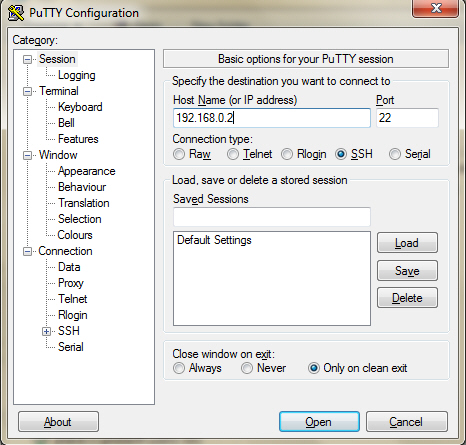
Terminal screen opens. Give the user name and password credentials.
The connection is now completed.
|
|
In SSH terminal screen, write 'busybox -–help' to get a list of commands.
|
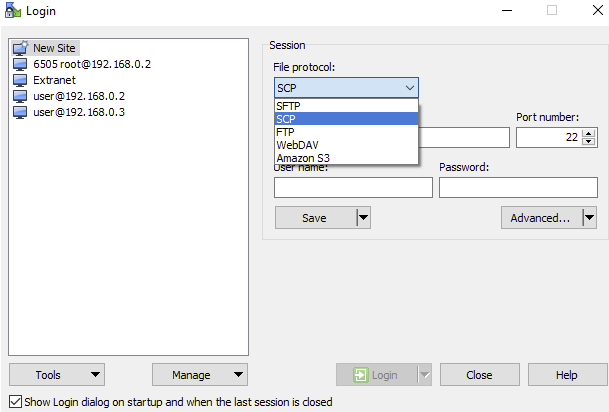
To connect using SCP
In the Login dialog box, select the SCP file protocol to be used and then click Login.
To connect using serial
Connect a USB-RS232 serial adapter to the USB slot on the 6505 Display Unit.
Open SSH client software, for example PuTTY and configure the following settings and click Open.
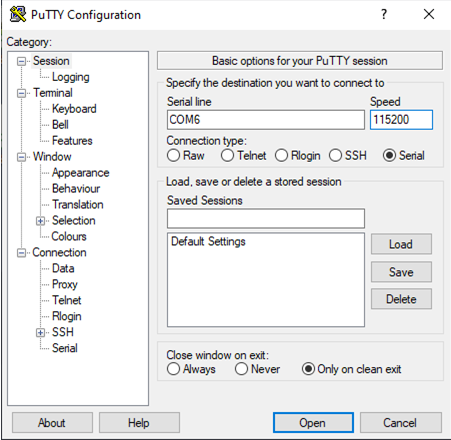
Terminal screen opens. Give the user name and password credentials.
The connection is now completed.
Source file topic000974.htm
Last updated 4-Sep-2025